SPU Basics#
The following codes are demos only. It’s NOT for production due to system security concerns, please DO NOT use it directly in production.
SPU devices are responsible for performing MPC computation in SecretFlow.
This tutorial would help you:
be familiar with SPU device and SPU Object
learn how to transfer a Python Object / PYU Object from/to SPU Object.
run MPC computation with SPU device.
Create an SPU Device#
Create SecretFlow Parties#
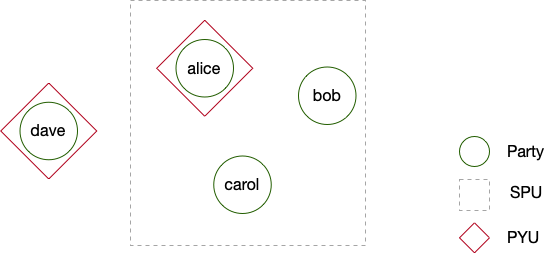
Parties are basic nodes in SecretFlow nodes. We are going to create four parties - alice, bob, carol and dave.
Based on four parties, we will set up three devices:
a PYU device based on alice
a PYU device based on dave
an SPU device based on alice, bob and carol
[1]:
import secretflow as sf

# Check the version of your SecretFlow
print('The version of SecretFlow: {}'.format(sf.__version__))

# In case you have a running secretflow runtime already.
sf.shutdown()

sf.init(['alice', 'bob', 'carol', 'dave'], address='local')
2023-06-17 18:30:38,459 INFO worker.py:1538 -- Started a local Ray instance.
Create a 3PC ABY3 SPU device#
After that, let’s create an SPU device with ABY3 protocol.
sf.utils.testing.cluster_def is a helper method to create a config by finding unused ports.
[2]:
aby3_config = sf.utils.testing.cluster_def(parties=['alice', 'bob', 'carol'])

aby3_config
[2]:
{'nodes': [{'party': 'alice', 'address': '127.0.0.1:49613'},
  {'party': 'bob', 'address': '127.0.0.1:52053'},
  {'party': 'carol', 'address': '127.0.0.1:25589'}],
 'runtime_config': {'protocol': 3, 'field': 3}}
Then let’s use aby3_config to create an SPU device and check its cluster_def.
[3]:
spu_device = sf.SPU(aby3_config)

spu_device.cluster_def
[3]:
{'nodes': [{'party': 'alice', 'address': '127.0.0.1:49613'},
  {'party': 'bob', 'address': '127.0.0.1:52053'},
  {'party': 'carol', 'address': '127.0.0.1:25589'}],
 'runtime_config': {'protocol': 3, 'field': 3}}
Lastly, let’s create two PYU devices.
[4]:
alice, dave = sf.PYU('alice'), sf.PYU('dave')
Pass Values to SPU device#
Before talking about computation with SPU device, let’s understand how to pass a Python object or a PYUObject to SPU device.
SPUObject#
A Python object or a PYUObject could be transferred into an SPUObject and secret-shared by SPU nodes.
sf.device.SPUIO is the helper class to do the job. You don’t need to call this method in your code. We just use it to demonstrate the structure of SPUObjects and everything happens for you.
Each SPUObject has two fields:
meta: The structure of the origin object.
shares: The secret sharing of the origin object.
[5]:
spu_io = sf.device.SPUIO(spu_device.conf, spu_device.world_size)

bank_account = [{'id': 12345, 'deposit': 1000.25}, {'id': 12345, 'deposit': 100000.25}]

import spu

meta, io_info, *shares = spu_io.make_shares(bank_account, spu.Visibility.VIS_SECRET)
INFO:jax._src.xla_bridge:Unable to initialize backend 'cuda': module 'jaxlib.xla_extension' has no attribute 'GpuAllocatorConfig'
INFO:jax._src.xla_bridge:Unable to initialize backend 'rocm': module 'jaxlib.xla_extension' has no attribute 'GpuAllocatorConfig'
INFO:jax._src.xla_bridge:Unable to initialize backend 'tpu': INVALID_ARGUMENT: TpuPlatform is not available.
INFO:jax._src.xla_bridge:Unable to initialize backend 'plugin': xla_extension has no attributes named get_plugin_device_client. Compile TensorFlow with //tensorflow/compiler/xla/python:enable_plugin_device set to true (defaults to false) to enable this.
WARNING:jax._src.xla_bridge:No GPU/TPU found, falling back to CPU. (Set TF_CPP_MIN_LOG_LEVEL=0 and rerun for more info.)
Let’s check meta first.
[6]:
meta
[6]:
[{'deposit': SPUValueMeta(shape=(), dtype=dtype('float32'), vtype=1, protocol=3, field=3, fxp_fraction_bits=0),
  'id': SPUValueMeta(shape=(), dtype=dtype('int32'), vtype=1, protocol=3, field=3, fxp_fraction_bits=0)},
 {'deposit': SPUValueMeta(shape=(), dtype=dtype('float32'), vtype=1, protocol=3, field=3, fxp_fraction_bits=0),
  'id': SPUValueMeta(shape=(), dtype=dtype('int32'), vtype=1, protocol=3, field=3, fxp_fraction_bits=0)}]
I guess you could find meta preserves the structure of origin data and replaces the digits/arrays with SPUValueMeta:
data_type, indicates whether the value is integer or fixed points.
visibility, indicates whether the value is a secret or a public content.
storage_type, indicates attributes of value, e.g. MPC protocol(ABY3 in our case), field size(128 bits in our case), etc
Then let’s check shares of bank_account_spu. Since we are passing data to a 3PC SPU device. We would have three pieces of shares, and we are going to check the first piece.
[7]:
assert len(shares) == 12

shares[0]
[7]:
[{'deposit': b'\x08\n\x10\x01"\x10aby3.AShr<FM128>* \xcd\xbd\xed#\x06\x04\x0f\xebJ\xdc\xdf\x1b\xacUe\xdc\xbe\'\x94\xbb\xf8?\xa9-\x99\xc8TzM\xf3\xe4\xaf',
  'id': b'\x08\x06\x10\x01"\x10aby3.AShr<FM128>* \xf0\x8b\xaa\xc4\xe5V\x8a^\xffq>\xee\x08\x85\xa6\x87\x82C\xb6\xbf|_\xff\x18\xfb\xb7\xe3`\x86\xea\xc9\x1a'},
 {'deposit': b'\x08\n\x10\x01"\x10aby3.AShr<FM128>* \xbaB\x18\xa6\x84\x9eW\xa3\xe8\x18\xc6\x81\xc7\x1dp\'\x03\xb4\xa7\xa6\x9e\x0eF\xfan\x81\xd33,\xcd\x05X',
  'id': b'\x08\x06\x10\x01"\x10aby3.AShr<FM128>* xj\xde\x12\xa9\x82\xdfi\xaahZ\x16\r\xdeH\x15$\x17\xce\x05\x8f\x9b\x9f\xc5\x81d\x94!\xab\x983\xaf'}]
You should find a piece of shares of SPU Object is very similar to meta and origin data. It still preserves the structure of origin data while digits are replaced by encoded secret (try to guess the origin data if you would like to).
Well, let’s reconstruct the origin Python object from SPU object.
[8]:
bank_account_hat = spu_io.reconstruct(shares, io_info, meta)
bank_account_hat
[8]:
[{'deposit': array(1000.25, dtype=float32), 'id': array(12345, dtype=int32)},
 {'deposit': array(100000.25, dtype=float32), 'id': array(12345, dtype=int32)}]
If you compare bank_account_hat with origin bank_account, you should find all the digits in bank_account_hat have become numpy.array but values are preseved.
Pass a PYU Object from PYU to SPU#
First, we create a PYU object with a PYU device.
[9]:
def debit_amount():
    return 10


debit_amount_pyu = alice(debit_amount)()
debit_amount_pyu
[9]:
<secretflow.device.device.pyu.PYUObject at 0x7fd98cd09130>
Then let’s pass debit_amount_pyu from PYU to SPU. We will get an SPU object as result. Under the hood, alice calls sf.device.SPUIO.make_shares to get meta and shares to send to nodes of the spu device.
[10]:
debit_amount_spu = debit_amount_pyu.to(spu_device)

debit_amount_spu
[10]:
<secretflow.device.device.spu.SPUObject at 0x7fd817a03c70>
Let’s check meta of debit_amount_spu.
[11]:
debit_amount_spu.meta
[11]:
ObjectRef(e0dc174c83599034ffffffffffffffffffffffff0100000001000000)
Oh no, it’s a Ray ObjectRef located at alice part. So how about shares of debit_amount_spu?
[12]:
debit_amount_spu.shares_name
[12]:
[ObjectRef(f4402ec78d3a260750696baee0bc0bb42b40620a0100000001000000),
 ObjectRef(f91b78d7db9a65936b44b364879d9518bec82ea10100000001000000),
 ObjectRef(82891771158d68c155ebf101d0aa7682c810dad40100000001000000)]
So you get a list of ObjectRef! Since it’s located at alice part, we couldn’t check the value at host.
But if you are really curious, we could use sf.reveal to check the origin value. Be careful to use sf.reveal in production! When sf.reveal are applied on SPUObjects, sf.device.SPUIO.reconstruct are called for you.
[13]:
sf.reveal(debit_amount_spu)
(_run pid=102815) INFO:jax._src.xla_bridge:Unable to initialize backend 'cuda': module 'jaxlib.xla_extension' has no attribute 'GpuAllocatorConfig'
(_run pid=102815) INFO:jax._src.xla_bridge:Unable to initialize backend 'rocm': module 'jaxlib.xla_extension' has no attribute 'GpuAllocatorConfig'
(_run pid=102815) INFO:jax._src.xla_bridge:Unable to initialize backend 'tpu': INVALID_ARGUMENT: TpuPlatform is not available.
(_run pid=102815) INFO:jax._src.xla_bridge:Unable to initialize backend 'plugin': xla_extension has no attributes named get_plugin_device_client. Compile TensorFlow with //tensorflow/compiler/xla/python:enable_plugin_device set to true (defaults to false) to enable this.
(_run pid=102815) WARNING:jax._src.xla_bridge:No GPU/TPU found, falling back to CPU. (Set TF_CPP_MIN_LOG_LEVEL=0 and rerun for more info.)
[13]:
array(10, dtype=int32)
Pass a Python Object from Host to SPU#
Let’s pass a dict from Host to SPU device.
NOTE: I know it looks weird. At this moment, if you want to pass a Python object to SPU device, you have to pass it to a PYU.
[14]:
bank_account_spu = sf.to(alice, bank_account).to(spu_device)
Summary#
This is the first part of Data Flow with SPU device, at this moment, you should be aware of the following facts.
A Python Object/PYU Object could be transferred to an SPU Object.
An SPU Object consists of meta and shares.
sf.to and sf.reveal calls sf.device.SPUIO to transfer between SPUObjects and Python objects.
Just converting to SPU Object won’t trigger data flow from PYU to SPU. e.g. When you transferred a PYU object to an SPU object. All the field of SPU objects including meta and shares are still located at the PYU device. The shares would only be sent to parties of SPU device when computation do happen. In short, data flow is lazy.
Computation with SPU Device#
Since we have two SPU objects - bank_account_spu and debit_amount_spu as inputs. Let’s try to do some computation with SPU device.
[15]:
def deduce_from_account(bank_account, amount):
    new_bank_account = []

    for account in bank_account:
        account['deposit'] = account['deposit'] - amount
        new_bank_account.append(account)

    return new_bank_account


new_bank_account_spu = spu_device(deduce_from_account)(
    bank_account_spu, debit_amount_spu
)

new_bank_account_spu
[15]:
<secretflow.device.device.spu.SPUObject at 0x7fd98cca88b0>
new_bank_account_spu is also a SPUObject. But it’s a bit different from debit_amount_spu!
debit_amount_spu is located at alice, so only alice could check value.
new_bank_account_spu is located at spu, each party of spu have a piece of shares. And you couldn’t check the value directly without sf.reveal.
Well, but what happened behind computation of SPU device?
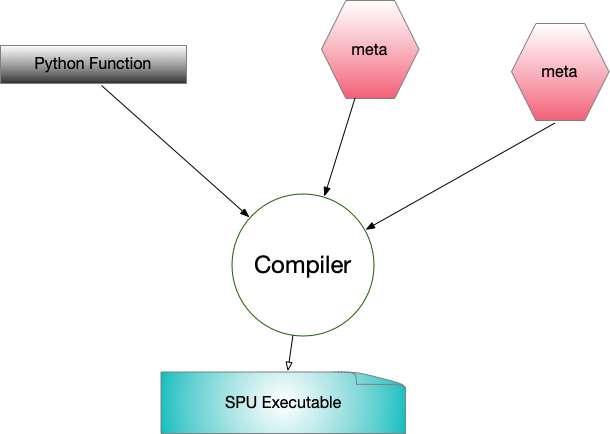
Step 1: Compile Python(Jax) Code to SPU Executable#
The Python function (deduce_from_account in our case) and metas of all inputs (bank_account_spu and debit_amount_spu) would be sent to one party of SPU device. Then SPU compiler would be used to compile them to SPU Executable.
Step 2: Distribute the SPU Executable and Shares to SPU parties.#
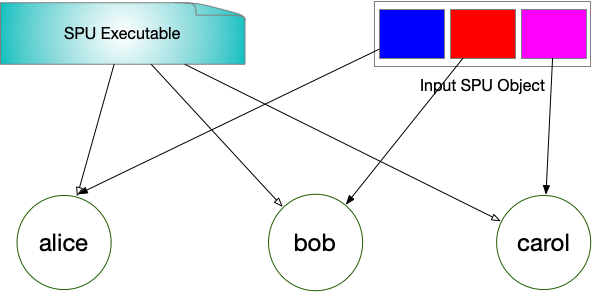
Each party of SPU device would get:
one copy of SPU Executable
one piece of each SPU Object share
Step 3: Run SPU Executable and Assembly SPU Object#
Then each party of SPU device would execute SPU Executable.
In the end, each party of SPU device would own a piece of output SPU Objects and a copy of meta.
Then SecretFlow framework would use them to assembly SPU Objects.
Get Value from SPU Device#
But in the end, we need to get value from spu, we couldn’t always keep SPUObject as secret!
Most common way of handling SPUObject is pass the secret to one party. This party is not necessarily one of parties consisting of SPU device.
[16]:
new_bank_account_pyu = new_bank_account_spu.to(dave)

new_bank_account_pyu
[16]:
<secretflow.device.device.pyu.PYUObject at 0x7fd98cd754f0>
We just pass new_bank_account_spu to pyu, then it becomes a PYUObject! And it’s owned by dave. Let’s check the value of new_bank_account_pyu.
[17]:
sf.reveal(new_bank_account_pyu)
[17]:
[{'deposit': array(990.25, dtype=float32), 'id': array(12345, dtype=int32)},
 {'deposit': array(99990.25, dtype=float32), 'id': array(12345, dtype=int32)}]
We could also pass SPUObject to host directly. The magic is sf.reveal. And again, be careful in production!
[18]:
sf.reveal(new_bank_account_spu)
[18]:
[{'deposit': array(990.25, dtype=float32), 'id': array(12345, dtype=int32)},
 {'deposit': array(99990.25, dtype=float32), 'id': array(12345, dtype=int32)}]
Advanced Topic: Use Different MPC Protocol#
At this moment, SPU device supports multiple MPC protocol besides ABY3. It’s easy to use different MPC protocol - just set the proper field in cluster def.
For instance, if someone would like to use 2PC protocol - Cheetah, You should prepare another cluster def:
[19]:
import spu

import secretflow as sf

# In case you have a running secretflow runtime already.
sf.shutdown()

sf.init(['alice', 'bob', 'carol', 'dave'], address='local')

cheetah_config = sf.utils.testing.cluster_def(
    parties=['alice', 'bob'],
    runtime_config={
        'protocol': spu.spu_pb2.CHEETAH,
        'field': spu.spu_pb2.FM64,
    },
)
2023-06-17 18:30:47,897 INFO worker.py:1538 -- Started a local Ray instance.
Then you could create an SPU device with cheetah_config.
[20]:
spu_device2 = sf.SPU(cheetah_config)
Let’s check the cluster_def of spu_device2.
[21]:
spu_device2.cluster_def
[21]:
{'nodes': [{'party': 'alice', 'address': '127.0.0.1:64555'},
  {'party': 'bob', 'address': '127.0.0.1:30243'}],
 'runtime_config': {'protocol': 4, 'field': 2}}
We could use spu_device2 to check famous Yao’s Millionaires’ problem.
[22]:
def get_carol_assets():
    return 1000000


def get_dave_assets():
    return 1000002


carol, dave = sf.PYU('carol'), sf.PYU('dave')

carol_assets = carol(get_carol_assets)()
dave_assets = dave(get_dave_assets)()
We use spu_device2 to check if carol is richer.
[23]:
def get_winner(carol, dave):
    return carol > dave


winner = spu_device2(get_winner)(carol_assets, dave_assets)

sf.reveal(winner)
(_run pid=112466) INFO:jax._src.xla_bridge:Unable to initialize backend 'cuda': module 'jaxlib.xla_extension' has no attribute 'GpuAllocatorConfig'
(_run pid=112466) INFO:jax._src.xla_bridge:Unable to initialize backend 'rocm': module 'jaxlib.xla_extension' has no attribute 'GpuAllocatorConfig'
(_run pid=112466) INFO:jax._src.xla_bridge:Unable to initialize backend 'tpu': INVALID_ARGUMENT: TpuPlatform is not available.
(_run pid=112466) INFO:jax._src.xla_bridge:Unable to initialize backend 'plugin': xla_extension has no attributes named get_plugin_device_client. Compile TensorFlow with //tensorflow/compiler/xla/python:enable_plugin_device set to true (defaults to false) to enable this.
(_run pid=112466) WARNING:jax._src.xla_bridge:No GPU/TPU found, falling back to CPU. (Set TF_CPP_MIN_LOG_LEVEL=0 and rerun for more info.)
(_run pid=112459) INFO:jax._src.xla_bridge:Unable to initialize backend 'cuda': module 'jaxlib.xla_extension' has no attribute 'GpuAllocatorConfig'
(_run pid=112459) INFO:jax._src.xla_bridge:Unable to initialize backend 'rocm': module 'jaxlib.xla_extension' has no attribute 'GpuAllocatorConfig'
(_run pid=112459) INFO:jax._src.xla_bridge:Unable to initialize backend 'tpu': INVALID_ARGUMENT: TpuPlatform is not available.
(_run pid=112459) INFO:jax._src.xla_bridge:Unable to initialize backend 'plugin': xla_extension has no attributes named get_plugin_device_client. Compile TensorFlow with //tensorflow/compiler/xla/python:enable_plugin_device set to true (defaults to false) to enable this.
(_run pid=112459) WARNING:jax._src.xla_bridge:No GPU/TPU found, falling back to CPU. (Set TF_CPP_MIN_LOG_LEVEL=0 and rerun for more info.)
[23]:
array(False)
Advanced Topic: Multiple Returns from SPU Computation#
In most cases, we have multiple returns from the function executed by SPU device.
For instance,
[24]:
def get_multiple_outputs(x, y):
    return x + y, x - y
There are multiple options to handle this.
Option 1: Treat All Returns as Single#
This is the default behavior of SPU. Let’s see.
[25]:
single_output = spu_device2(get_multiple_outputs)(carol_assets, dave_assets)

single_output
[25]:
<secretflow.device.device.spu.SPUObject at 0x7fd98cd754c0>
We could see we only get a single SPUObject. Let’s reveal it.
[26]:
sf.reveal(single_output)
[26]:
(array(2000002, dtype=int32), array(-2, dtype=int32))
So single_output itself actually represents a tuple.
Option 2: Decide Return Nums on the Fly#
We can also instruct SPU to decide return numbers for us.
[27]:
from secretflow.device.device.spu import SPUCompilerNumReturnsPolicy

multiple_outputs = spu_device2(
    get_multiple_outputs, num_returns_policy=SPUCompilerNumReturnsPolicy.FROM_COMPILER
)(carol_assets, dave_assets)

multiple_outputs
[27]:
(<secretflow.device.device.spu.SPUObject at 0x7fd98cce0400>,
 <secretflow.device.device.spu.SPUObject at 0x7fd98cce0490>)
let’s check two outputs respectively.
[28]:
print(sf.reveal(multiple_outputs[0]))
print(sf.reveal(multiple_outputs[1]))
2000002
-2
Option 3: Decide Return Nums Manually#
If possible, you could also set return nums manually.
[29]:
user_multiple_outputs = spu_device2(
    get_multiple_outputs,
    num_returns_policy=SPUCompilerNumReturnsPolicy.FROM_USER,
    user_specified_num_returns=2,
)(carol_assets, dave_assets)

user_multiple_outputs
[29]:
[<secretflow.device.device.spu.SPUObject at 0x7fd98cce0a60>,
 <secretflow.device.device.spu.SPUObject at 0x7fd98cce0af0>]
let’s also check two outputs respectively.
[30]:
print(sf.reveal(multiple_outputs[0]))
print(sf.reveal(multiple_outputs[1]))
2000002
-2
Let’s summarize what we have:
Be default, SPU treats all the returns as a single return
Since SPU compiler generates the SPU executable, it can figure out return nums. However, the options results some latency since we have to make compilation blocked.
If you want to avoid latency, we can provide return nums manually. But you have to make sure you provide the right nums, otherwise, the program would complain!
What’s Next?#
After learning basics of SPU, you may check some advanced tutorials with SPU: